How do I set up screen lock on Beam?
You can add an extra layer of security to Beam by enabling screen lock. This allows you to lock Beam with a PIN or biometric authentication, such as your fingerprint.
Choose something you can remember. If you forget this PIN, you will be logged out of the app.
With this extra security, your Beam history cannot be accessed if your device is lost or stolen.
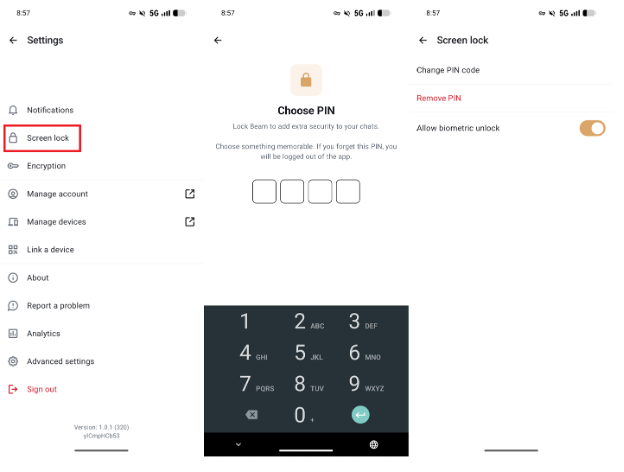
Steps to enable screen lock on Beam:
- In Beam, tap your profile photo and select Screen Lock.
- Choose a 4-digit PIN
- After setting a PIN, you'll have the option to enable Biometric Authentication.
If you need help with Beam, please contact the IT support team of your organization or visit our extensive help documentation.